First, a brief description of this PVE server’s disk setup: there are two 2T mechanical hard drives. One is used to install the PVE system and allocate virtual disks to VMs. The other 2T drive is dedicated to periodic automatic VM backups (stored with ZSTD compression, keeping the last 3 backups). One VM, vm-100 (KVM mode, though the issue should be independent of virtualization type), has two virtual disks: a 200G /dev/sda1 and a 1T /dev/sdb1. The 200G disk is used to install the OS (Debian 10), and the 1T disk is used for service data storage.
Initially, one service’s data was stored on the main system partition on the 200G virtual disk. Since I did not anticipate how fast the service data would grow, the 200G system disk quickly filled up. So I scheduled some time to migrate that service’s data directory to the 1T disk mount point. After a series of operations (I even messed up once by using cp without preserving file permissions, causing the service to fail to start after migration, and had to redo it with cp -a), the service resumed normal operation.
However, during subsequent PVE automatic backup tasks, backup failures started to occur. Checking the PVE logs, I saw errors like this (from the automatic backup notification email):
100: 2026-05-12 04:00:00 INFO: Starting Backup of VM 100 (qemu)
100: 2026-05-12 04:00:00 INFO: status = running
100: 2026-05-12 04:00:00 INFO: VM Name: xh-data-server
100: 2026-05-12 04:00:00 INFO: include disk 'scsi0' 'local-lvm:vm-100-disk-0' 203G
100: 2026-05-12 04:00:00 INFO: include disk 'scsi1' 'local-lvm:vm-100-disk-1' 1T
100: 2026-05-12 04:00:00 INFO: backup mode: snapshot
100: 2026-05-12 04:00:00 INFO: ionice priority: 7
100: 2026-05-12 04:00:00 INFO: creating vzdump archive '/mnt/sdb1/dump/vzdump-qemu-100-2026_05_12-04_00_00.vma.zst'
100: 2026-05-12 04:00:00 INFO: issuing guest-agent 'fs-freeze' command
100: 2026-05-12 04:00:01 INFO: issuing guest-agent 'fs-thaw' command
100: 2026-05-12 04:00:01 INFO: started backup task '1322dd3c-8aa3-4f07-bcf8-337628701d4e'
100: 2026-05-12 04:00:01 INFO: resuming VM again
100: 2026-05-12 04:00:04 INFO:   0% (561.1 MiB of 1.2 TiB) in 3s, read: 187.0 MiB/s, write: 141.6 MiB/s
100: 2026-05-12 04:03:06 INFO:   1% (12.3 GiB of 1.2 TiB) in 3m 5s, read: 66.1 MiB/s, write: 61.7 MiB/s
100: 2026-05-12 04:04:52 INFO:   2% (24.6 GiB of 1.2 TiB) in 4m 51s, read: 118.7 MiB/s, write: 110.7 MiB/s
100: 2026-05-12 04:06:39 INFO:   3% (36.9 GiB of 1.2 TiB) in 6m 38s, read: 117.6 MiB/s, write: 108.9 MiB/s
100: 2026-05-12 04:08:32 INFO:   4% (49.1 GiB of 1.2 TiB) in 8m 31s, read: 110.7 MiB/s, write: 103.7 MiB/s
100: 2026-05-12 04:10:25 INFO:   5% (61.4 GiB of 1.2 TiB) in 10m 24s, read: 111.3 MiB/s, write: 104.5 MiB/s
100: 2026-05-12 04:12:17 INFO:   6% (73.6 GiB of 1.2 TiB) in 12m 16s, read: 112.2 MiB/s, write: 105.4 MiB/s
100: 2026-05-12 04:14:09 INFO:   7% (86.0 GiB of 1.2 TiB) in 14m 8s, read: 112.6 MiB/s, write: 105.4 MiB/s
100: 2026-05-12 04:16:00 INFO:   8% (98.2 GiB of 1.2 TiB) in 15m 59s, read: 113.3 MiB/s, write: 104.2 MiB/s
100: 2026-05-12 04:17:51 INFO:   9% (110.5 GiB of 1.2 TiB) in 17m 50s, read: 112.6 MiB/s, write: 105.4 MiB/s
100: 2026-05-12 04:19:43 INFO:  10% (122.7 GiB of 1.2 TiB) in 19m 42s, read: 112.3 MiB/s, write: 105.4 MiB/s
100: 2026-05-12 04:21:36 INFO:  11% (135.0 GiB of 1.2 TiB) in 21m 35s, read: 111.3 MiB/s, write: 104.4 MiB/s
100: 2026-05-12 04:23:27 INFO:  12% (147.2 GiB of 1.2 TiB) in 23m 26s, read: 112.7 MiB/s, write: 105.7 MiB/s
100: 2026-05-12 04:25:20 INFO:  13% (159.6 GiB of 1.2 TiB) in 25m 19s, read: 112.1 MiB/s, write: 105.3 MiB/s
100: 2026-05-12 04:27:13 INFO:  14% (171.8 GiB of 1.2 TiB) in 27m 12s, read: 110.6 MiB/s, write: 103.5 MiB/s
100: 2026-05-12 04:28:46 INFO:  15% (184.2 GiB of 1.2 TiB) in 28m 45s, read: 136.2 MiB/s, write: 124.4 MiB/s
100: 2026-05-12 04:30:35 INFO:  16% (196.4 GiB of 1.2 TiB) in 30m 34s, read: 114.6 MiB/s, write: 106.8 MiB/s
100: 2026-05-12 04:32:29 INFO:  17% (208.6 GiB of 1.2 TiB) in 32m 28s, read: 110.1 MiB/s, write: 103.4 MiB/s
100: 2026-05-12 04:35:02 INFO:  18% (220.9 GiB of 1.2 TiB) in 35m 1s, read: 82.1 MiB/s, write: 77.1 MiB/s
100: 2026-05-12 04:38:26 INFO:  19% (233.2 GiB of 1.2 TiB) in 38m 25s, read: 61.6 MiB/s, write: 57.8 MiB/s
100: 2026-05-12 04:41:12 INFO:  20% (245.5 GiB of 1.2 TiB) in 41m 11s, read: 75.8 MiB/s, write: 70.8 MiB/s
100: 2026-05-12 04:43:36 INFO:  21% (257.7 GiB of 1.2 TiB) in 43m 35s, read: 87.0 MiB/s, write: 81.1 MiB/s
100: 2026-05-12 04:45:52 INFO:  22% (269.9 GiB of 1.2 TiB) in 45m 51s, read: 92.2 MiB/s, write: 86.4 MiB/s
100: 2026-05-12 04:47:57 INFO:  23% (282.3 GiB of 1.2 TiB) in 47m 56s, read: 101.1 MiB/s, write: 93.7 MiB/s
100: 2026-05-12 04:49:55 INFO:  24% (294.5 GiB of 1.2 TiB) in 49m 54s, read: 106.1 MiB/s, write: 99.5 MiB/s
100: 2026-05-12 04:52:02 INFO:  25% (306.8 GiB of 1.2 TiB) in 52m 1s, read: 99.2 MiB/s, write: 93.0 MiB/s
100: 2026-05-12 04:53:03 INFO:  25% (310.8 GiB of 1.2 TiB) in 53m 2s, read: 66.8 MiB/s, write: 62.6 MiB/s
100: 2026-05-12 04:53:03 ERROR: vma_queue_write: write error - Broken pipe
100: 2026-05-12 04:53:03 INFO: aborting backup job
100: 2026-05-12 04:53:03 INFO: resuming VM again
100: 2026-05-12 04:53:04 ERROR: Backup of VM 100 failed - vma_queue_write: write error - Broken pipe
Digging into the system logs, I found disk full errors. Checking the 2T backup disk, I saw that its space was completely exhausted. PVE’s backup logic works like this: if you configure it to keep the last 3 backups, it will actually create a 4th backup first, and only after that succeeds will it delete the oldest one, leaving 3. So at peak, 4 backups coexist.
Looking at historical backups, I noticed that compared to before I moved the service data folder, backup size had tripled. The .zst files used to be around 200G per backup, but after the changes, each backup ballooned to about 700G, and the backup time increased significantly. This was confusing, because after the migration I had deleted all unnecessary files. Inside the VM, df -hT showed that the total used space across both partitions was only about 200G. So why did the backup see more than triple that size?
After carefully confirming that I had not accidentally left any large unused files behind, I started to suspect that PVE’s storage might have some kind of internal buffer or pool. Maybe the repeated copy operations had expanded this pool, causing the backup size to explode.
So I described the phenomenon to GPT, and followed its suggestion to run lvs on the PVE host. Sure enough, I found that the Data% usage for the logical volumes assigned to vm-100 was abnormally high and clearly inconsistent with the actual usage reported by df -hT inside the VM. Following the next steps, I began optimizing.
The first step was to ensure that the VM’s virtual disks had discard=on enabled in the hardware configuration, as shown:
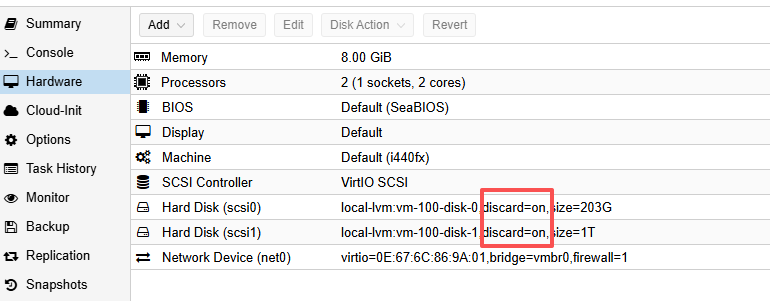
If it is not enabled, you need to turn it on manually. In my case, it was initially off. GPT first suggested using these commands on the PVE host:
qm set 100 -scsi0 local-lvm:vm-100-disk-0,discard=on
qm set 100 -scsi1 local-lvm:vm-100-disk-1,discard=on
After running these, I followed the instructions and executed fstrim -av inside the VM to trim the disks. The command output showed messages like XXX GiB trimmed on /dev/sda1 and XXX GiB trimmed on /dev/sdb1. However, when I checked lvs on the PVE host, the Data% value did not decrease. Manually triggering a backup also still produced very large .zst files.
I asked GPT again and got some hallucinated answers, which led me around in circles. Eventually I discovered the real issue: after adding discard=on, the VM must be fully powered off and then started again for the setting to take effect. A simple reboot from inside the guest OS is not enough. This behavior is also visible in the PVE web UI: if a configuration change has not taken effect, it is highlighted in yellow to indicate that a full restart is required.
After completely shutting down and restarting the VM so that discard=on was active on both disks, I ran fstrim -av again inside the VM. Then, checking lvs on the PVE host, I saw that Data% had dropped to match the actual used space. Subsequent automatic backups produced .zst files of around 200G again, which is a reasonable size.
博主友情提示:
如您在评论中需要提及如QQ号、电子邮件地址或其他隐私敏感信息,欢迎使用>>博主专用加密工具v3<<处理后发布,原文只有博主可以看到。