First, download the Qt offline installer here: https://www.qt.io/offline-installers. During installation you will still be asked to log in. On Linux systems you can set an invalid proxy as described in the reference link. On Windows you can disable the network connection to skip the login.
This way the installation proceeds without requiring a Qt account.
QtTest.exe (15068): Loaded 'D:\Qt\6.8.3\msvc2022_64\plugins\styles\qmodernwindowsstyled.dll'. Symbols loaded.
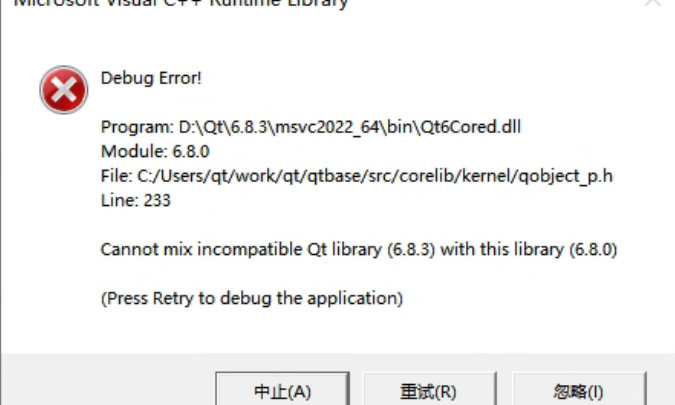
Cannot mix incompatible Qt library (6.8.3) with this library (6.8.0)
Debug Error!

Program: D:\Qt\6.8.3\msvc2022_64\bin\Qt6Cored.dll
Module: 6.8.0
File: C:/Users/qt/work/qt/qtbase/src/corelib/kernel/qobject_p.h
Line: 233

Cannot mix incompatible Qt library (6.8.3) with this library (6.8.0)

(Press Retry to debug the application)
This error occurred in a simple test program using QOpenGLWidget. The message clearly indicates that different versions of Qtlibraries were mixed. Searching online shows many similar cases, usually caused by overlapping Qt DLL versions in the system PATH, because Qt loads many dynamic libraries as plugins. But after checking repeatedly, I confirmed that my environment did not have this issue. I only had one Qt installation, the prebuilt 6.8.3 version installed via Qt MaintenanceTool under D:\Qt\6.8.3. If I ignored the error, the program still ran correctly, but the popup was annoying, so I needed to investigate.
Recently while learning the QtRHI graphics rendering framework I encountered a strange problem: QRhiGraphicsPipeline inexplicably returned false on create! During the time this problem appeared, I was debugging the fragment shader, specifically studying HDR display shaders, and frequently toggling Windows HDR on and off. At one point I thought it was a system issue, so I tried switching to SDR, but the error persisted.
Later, after spending some time reverting modifications, I finally isolated the cause…