Visual Studio

Recovering Advanced Save Options in Visual Studio 2017…

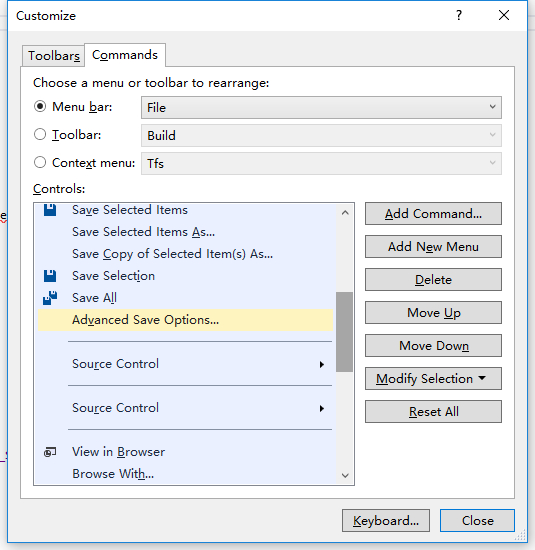
In older versions of VS, the File menu had an item called Advanced Save Options, which allowed choosing the text encoding format of source files. After upgrading to 2017 (fresh installation with all default settings), I found this option was gone (Community edition)!

Actually it is just hidden by default, but you can bring it back through the Customize menu function:
Go to Tools → Customize… → Commands → Menu Bar: File → Add Command → File → Advanced Save Options…, then drag it to the position you prefer!

I feel this option should be quite commonly used, so I do not know why it is hidden by default.
FFmpeg native script building Windows debug version debugging and tracing issues

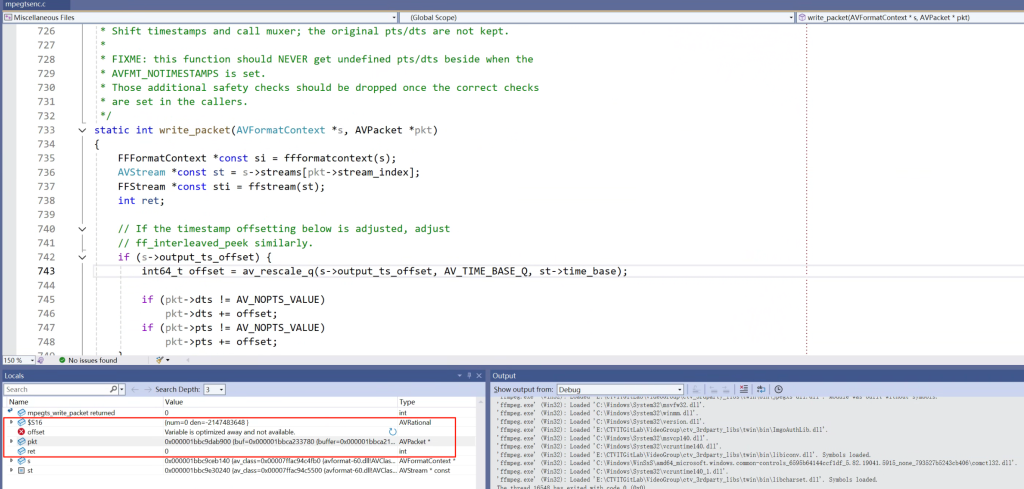
This time I want to record what feels like a rather hardcore problem. Due to the title length limit, it’s impossible to accurately express all the issues. For example, when debugging FFmpeg code with breakpoints and single‑stepping, the code does not execute in order, jumps around unpredictably, and when checking local variables near a breakpoint, their values cannot be displayed correctly, such as this:

The local variable “offset” cannot show its current value and instead displays “Variable is optimized away and not available.” From the literal meaning, we can guess that the compiler optimized the code, such as inlining and removing intermediate variables, so they can no longer be seen.

However, FFmpeg’s configure parameters for building the debug version do include:

–disable-optimizations –enable-debug –disable-stripping

These officially documented debug build parameters. So why do we still encounter all the debugging obstacles described above, which look like the result of compiler optimizations?

Continue reading…