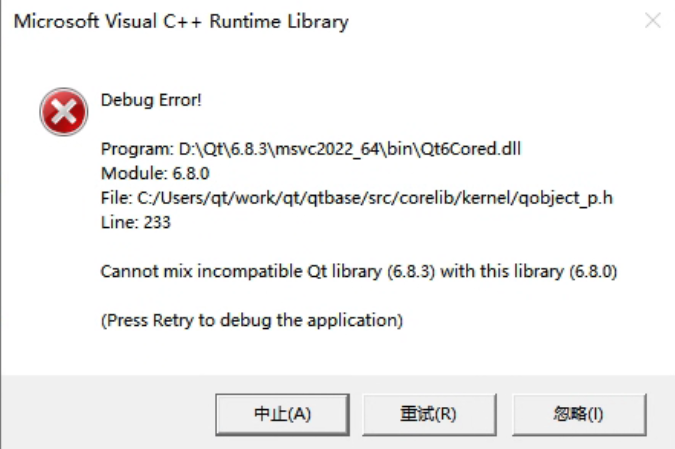
The complete error message looks like this:
Output in the debug console:
QtTest.exe (15068): Loaded 'D:\Qt\6.8.3\msvc2022_64\plugins\styles\qmodernwindowsstyled.dll'. Symbols loaded.
Cannot mix incompatible Qt library (6.8.3) with this library (6.8.0)
Debug Error!

Program: D:\Qt\6.8.3\msvc2022_64\bin\Qt6Cored.dll
Module: 6.8.0
File: C:/Users/qt/work/qt/qtbase/src/corelib/kernel/qobject_p.h
Line: 233

Cannot mix incompatible Qt library (6.8.3) with this library (6.8.0)

(Press Retry to debug the application)
This error occurred in a simple test program using QOpenGLWidget. The message clearly indicates that different versions of Qt libraries were mixed. Searching online shows many similar cases, usually caused by overlapping Qt DLL versions in the system PATH, because Qt loads many dynamic libraries as plugins. But after checking repeatedly, I confirmed that my environment did not have this issue. I only had one Qt installation, the prebuilt 6.8.3 version installed via Qt Maintenance Tool under D:\Qt\6.8.3. If I ignored the error, the program still ran correctly, but the popup was annoying, so I needed to investigate.
After some debugging, I found a strange phenomenon. In main.cpp:
#include <QApplication>
// #include <QLabel>
#include  "GLCubeWidget.h"

int main(int argc, char *argv[])
{
    QApplication app(argc, argv);

    // QLabel *label = new QLabel("Hello Qt6!");
    // label->setAlignment(Qt::AlignCenter);
    // label->resize(300, 200);
    // label->show();

    GLCubeWidget *wdg = new GLCubeWidget();
    wdg->resize(300, 200);
    wdg->show();

    return app.exec();
}
If I ran the commented code that only displayed a QLabel, there was no problem at all. But if I displayed GLCubeWidget, which inherits from QOpenGLWidget, the error appeared.
After further investigation, I finally located the cause. Previously, on this machine, I had encountered a Qt 6.8.3 bug (if I remember correctly, related to dragging a window after maximizing). At that time I used a temporary workaround: I replaced Qt6Cored, Qt6Guid, Qt6Widgetsd, and plugins\platforms\qwindowsd.dll with the 6.8.0 versions.
Because of this, when the program only used features involving those replaced libraries, it effectively behaved as Qt 6.8.0 and no error appeared. But once the program used functionality outside those libraries, Qt’s internal protection logic detected the version mismatch and reported the error.
Restoring the replaced DLLs back to the correct 6.8.3 versions solved the problem.
博主友情提示:
如您在评论中需要提及如QQ号、电子邮件地址或其他隐私敏感信息,欢迎使用>>博主专用加密工具v3<<处理后发布,原文只有博主可以看到。