After installing the 816HD mod chip on my long‑unused PS2, the console essentially reached the 230 BIOS 9W perfect state. PS1 games were also fully supported (so far I have not seen any functional impact from the two‑reset behavior). Naturally, when replaying classic PS1 titles, saving is essential, so I dug out my PS1 memory card that had been stored for 15 years (I used it back in arcade shops):
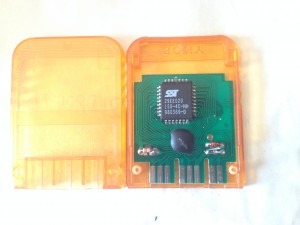
When I inserted it into the PS2, the browser could not recognize it. Searching online, I found many forum discussions about this issue. In short, PS2 has poor compatibility with PS1 memory cards, especially assembled or off‑brand cards (mine is clearly a cheap clone using the so‑called ‘cow dung’ chip). Some users even reported the opposite: clone cards work but original Sony cards do not. Others mentioned that Sony’s PocketStation, which has an LCD screen, works 100% reliably. I also saw sellers on Taobao offering PS1 original cards claiming full PS2 compatibility.
Just when I was about to buy an original PS1 card, I discovered something surprising: although my old clone card could not be recognized in the PS2 memory card management screen, once I booted into a PS1 game, the card was recognized. It showed messages like ‘memory card full’ or ‘no usable save data’. This suggested the card was not broken, but simply suffering from a compatibility issue.
Later, while playing a Chinese‑translated Japanese version of Resident Evil 3, I found an old save file on the card. Loading worked normally, and saving (overwriting) also worked. So the card functions perfectly during PS1 mode on the PS2, even though the PS2’s memory card manager (and tools like uLaunchElf) cannot detect it.
Searching further, I found others describing the same phenomenon. This led me to suspect a hardware change in the PS2 that caused the compatibility problem. Eventually, I found the root cause via Google:
http://dreamjam.co.uk/emuviews/old2013.php
It states:
PS2 slim memory card incompatability
A subtle change was made to the PS2 slim hardware that made many third-party memory cards inoperable. The 8V supply was removed from the memory card port only (not the joystick port) and replaced with an output that is 0V when the system is in PS2 mode (while booting, in the memory card browser, or when playing a PS2 game) and is 3.3V when playing a PS1 game. This causes all memory cards that use 5V parts to fail as the input voltage to the regulator is now too low to produce the proper 5V output.
So the root cause is that PS2 slim models changed the memory card slot power supply. The original 8V supply (the third pin from the right in the screenshot) outputs 0V in PS2 mode (memory card manager, homebrew, PS2 games) and 3.3V in PS1 mode. Properly compatible cards should use the fifth pin from the right, which provides standard 3.3V. My card uses the third pin, and the fifth pin is unused.
Interestingly, the card does not completely fail without 8V. In PS1 mode, the 3.3V supply is enough for it to operate (so far I have not seen read/write failures or save corruption). Checking the datasheet for the 29EE020, it is a 2 Mbit (256K x 8) page‑mode EEPROM with a nominal operating voltage of 5V. Because this clone card does not actually use the 8V supply, it can barely function under the PS1 mode’s 3.3V. The incompatible cards that show ‘unformatted’ or similar errors are likely failing due to this power supply issue.
Here are the known solutions to this compatibility problem:
1. Modify the PS2 memory card slot power supply. The joystick port still has 8V, so you can reroute that to the memory card slot. This involves modifying the console hardware, which is not ideal.
2. Use a PS2 multitap (four‑player adapter). Official versions still have the power issue, but a clone version called ‘4 Player Multi Tap PXII Compatible’ (search Taobao for 四分插) has circuitry that avoids the problem. Connecting the incompatible card through this multitap allows the PS2 memory card manager to recognize it.
3. Manage the memory card through other means, such as this DIY reader: http://www.raphnet.net/electronique/psx_cardmgr/psx_cardmgr_en.php, Taobao does not seem to have ready‑made readers. The circuit is simple, but requires a parallel port and a salvaged memory card connector. Modern PCs lack parallel ports, so practicality is low unless you enjoy DIY.
4. The simplest method: use a PS1 software tool that includes its own memory card manager, such as MTV Music Generator:
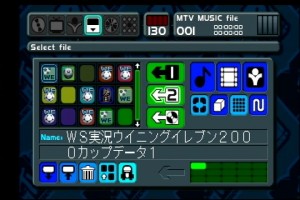 , This bypasses the PS2 mode entirely and manages the card in PS1 mode. All records can be recognized, deleted, and even formatted.
Finally, a note about the 816HD (and all 9W consoles) regarding the two‑reset behavior when running non‑original PS1 games and its effect on PS2’s built‑in PS1 disc speed‑up and texture smoothing options:
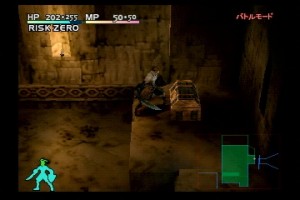
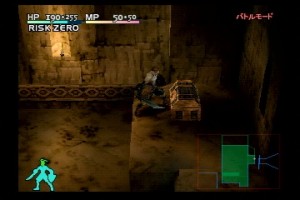
Testing showed that these two options are not saved after a full power‑off, but they are not reset by the double‑reset behavior. Once set, they remain active until the console is fully shut down. So the correct procedure with 816HD is: insert disc, power on, enter settings, adjust options, perform two resets, then enter the PS1 game. Speed‑up and smoothing work normally. Here are two comparison screenshots:
博主友情提示:
如您在评论中需要提及如QQ号、电子邮件地址或其他隐私敏感信息,欢迎使用>>博主专用加密工具v3<<处理后发布,原文只有博主可以看到。