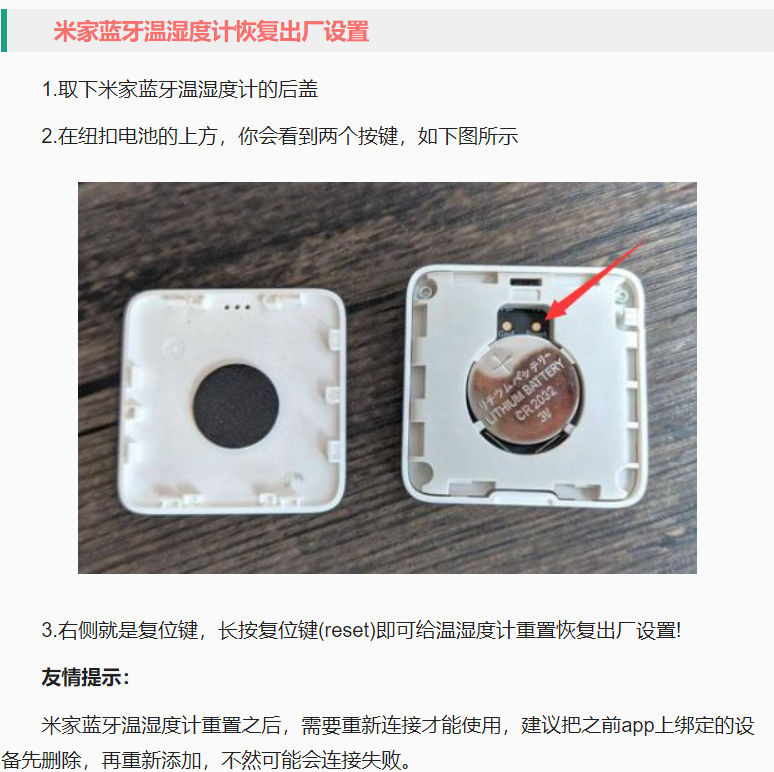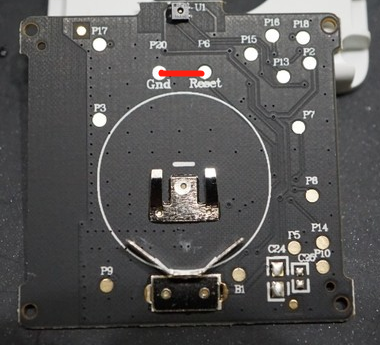
I have three Xiaomi Temperature and Humidity Sensor 2 devices at home, connected to the Xiaomi Smart Plug 2 Bluetooth gateway. They are small and convenient, allowing me to check home temperature and humidity anytime on my phone. Recently, after replacing the battery in one of them, a strange problem appeared: the device could be seen in the Mi Home app, and it showed as connected to the Bluetooth gateway, but no temperature or humidity data could be retrieved. Entering the device details page gave no response, only prompting “Turn on Bluetooth.” If I enabled phone Bluetooth, it would connect very slowly to the device and eventually retrieve data, but the process was sluggish, unlike before when the gateway connection was instant. This also meant that when away from home, I could no longer see real‑time data from this sensor (the gateway page in the app still showed the sensor connected with full signal). Later I checked the firmware and found it could be upgraded to the latest “0130.” I upgraded (the process was also very slow, probably due to Bluetooth transfer), but the problem remained! Searching online, I found people suggesting a reset, which brings us to today’s topic. The reset design of this Xiaomi sensor is rather unusual. Most online reset methods say this: