I have three Xiaomi Temperature and Humidity Sensor 2 devices at home, connected to the Xiaomi Smart Plug 2 Bluetooth gateway. They are small and convenient, allowing me to check home temperature and humidity anytime on my phone. Recently, after replacing the battery in one of them, a strange problem appeared: the device could be seen in the Mi Home app, and it showed as connected to the Bluetooth gateway, but no temperature or humidity data could be retrieved. Entering the device details page gave no response, only prompting “Turn on Bluetooth.” If I enabled phone Bluetooth, it would connect very slowly to the device and eventually retrieve data, but the process was sluggish, unlike before when the gateway connection was instant. This also meant that when away from home, I could no longer see real‑time data from this sensor (the gateway page in the app still showed the sensor connected with full signal). Later I checked the firmware and found it could be upgraded to the latest “0130.” I upgraded (the process was also very slow, probably due to Bluetooth transfer), but the problem remained! Searching online, I found people suggesting a reset, which brings us to today’s topic. The reset design of this Xiaomi sensor is rather unusual. Most online reset methods say this:
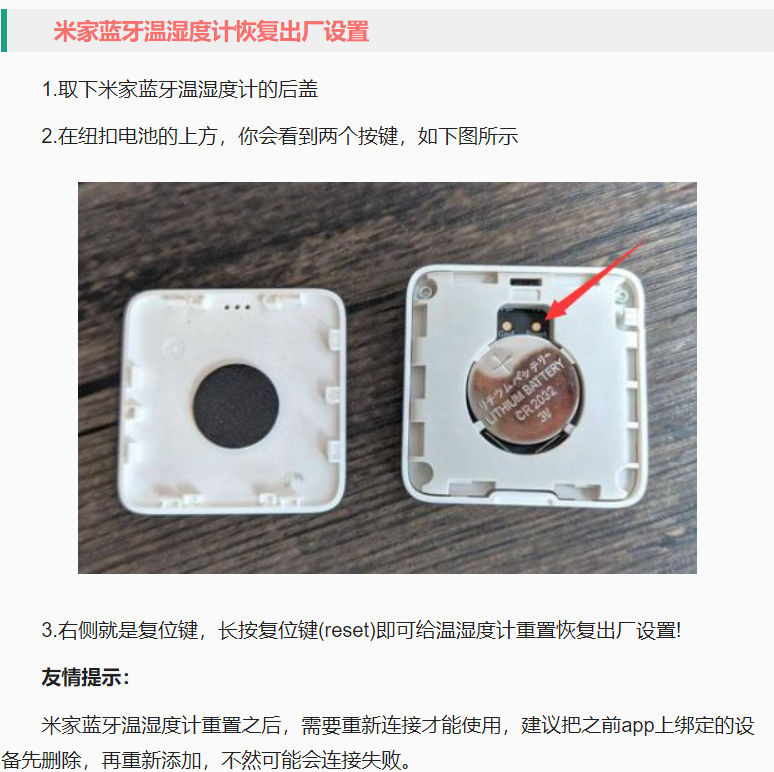
That right‑side “Reset” contact doesn’t look like a pressable button at all. I tried pressing it, but there was no button feel (and no reset effect). I don’t know which “expert” first wrote this method, but it spread online and misled others. Maybe some older version of the sensor had a real reset button? Unknown. Even stranger, some posts mention the left‑side “Gnd” contact, saying they don’t know what it’s for. Thinking about it, I guessed the reset might be achieved by shorting the reset contact to Gnd to pull the voltage low. So I used a Dupont wire to short these two contacts:
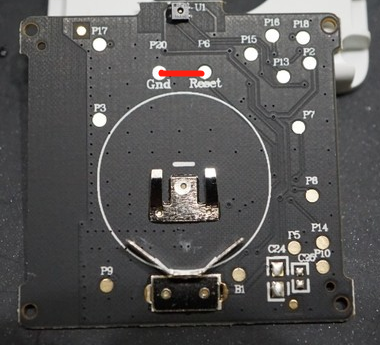
Sure enough, after about 3-4 seconds, the LCD lit up all segments briefly, then quickly returned to normal. This looked like a successful reset. The Mi Home app then reconnected to the sensor, all historical data was gone, and the Bluetooth gateway showed the device connected with full signal. After a while, the gateway resumed normal direct data retrieval from the sensor! Overall, this little device is still very convenient. I don’t know if the issue was caused by the way I replaced the battery. Recently I saw that Xiaomi released the Temperature and Humidity Sensor 3, with more powerful features, but unfortunately it no longer uses the CR2032 battery. For me, as a second‑generation user who already stocked up on many CR2032 batteries, that’s not very friendly, so I’ll hold off for now.
博主友情提示:
如您在评论中需要提及如QQ号、电子邮件地址或其他隐私敏感信息,欢迎使用>>博主专用加密工具v3<<处理后发布,原文只有博主可以看到。