软硬件使用
VS2010代码编辑窗口第一次编辑操作导致报错的问题
用VS2010打开一个C/C++项目,随便选个源代码文件,编辑,报错提示遇到异常,可能由于某Add-in导致等blah blah blah…,确定无视提示后继续编辑,写完一个函数的proto后IDE卡死,稍候直接大红叉异常,只能强制结束进程。
开始按照提示信息,怀疑是VM Ware的Virtual Debugger插件导致,于是花了一会时间把插件以正常添加/删除方式卸载掉,重启IDE,错误依旧,发现被M$的提示信息误导了!
用VS的命令行方式挂log参数启动,devenv /log,触发错误提示后查看ActivityLog.xml日志,xsl顺利的解析出了2条大红色的错误信息:
System.InvalidCastException: Unable to cast COM object of type ‘System.__ComObject’ to interface type ‘Microsoft.VisualStudio.TextManager.Interop.IVsTextReplaceEvents’. This operation failed because the QueryInterface call on the COM component for the interface with IID ‘{CF9928D9-65AE-4319-A446-94ED5C45ECDE}’ failed due to the following error: 不支持此接口 (Exception from HRESULT: 0x80004002 (E_NOINTERFACE)). at System.StubHelpers.StubHelpers.GetCOMIPFromRCW(Object objSrc, IntPtr pCPCMD, Boolean& pfNeedsRelease) at Microsoft.VisualStudio.TextManager.Interop.IVsTextReplaceEvents.OnReplace(ChangeInput[] pCI) at Microsoft.VisualStudio.Editor.Implementation.VsTextBufferAdapter.OnTextBufferChangedHighPriority(Object sender, TextContentChangedEventArgs e) at Microsoft.VisualStudio.Text.Utilities.GuardedOperations.RaiseEvent[TArgs](Object sender, EventHandler`1 eventHandlers, TArgs args)
System.InvalidCastException: Unable to cast COM object of type ‘System.__ComObject’ to interface type ‘Microsoft.VisualStudio.Editor.Implementation.IVsTextStreamEvents_Private’. This operation failed because the QueryInterface call on the COM component for the interface with IID ‘{96FC7D44-BCDD-4F00-AE4D-07E26B2C0E52}’ failed due to the following error: 不支持此接口 (Exception from HRESULT: 0x80004002 (E_NOINTERFACE)). at System.StubHelpers.StubHelpers.GetCOMIPFromRCW(Object objSrc, IntPtr pCPCMD, Boolean& pfNeedsRelease) at Microsoft.VisualStudio.Editor.Implementation.IVsTextStreamEvents_Private.OnChangeStreamText(Int32 iPos, Int32 iOldLen, Int32 iNewLen, Int32 fLast) at Microsoft.VisualStudio.Editor.Implementation.VsTextBufferAdapter.OnTextBufferChanged(Object sender, TextContentChangedEventArgs e) at Microsoft.VisualStudio.Text.Utilities.GuardedOperations.RaiseEvent[TArgs](Object sender, EventHandler`1 eventHandlers, TArgs args)
有了具体错误信息,发现是某个VS编辑COM控件的注册信息丢失导致,最后还算轻松的找到了解决方法:
Xcode4中code sign identity选项值不出下拉选择框的解决方法
问题出现时的系统、软件版本:
Mac OS X 10.6.8 (10K549)
Xcode Version 4.0.2 Build 4A2002a
出问题时的现象:
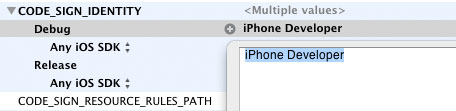
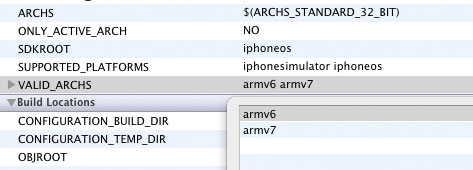
如上两图所示:选签证的选项不显示下拉选择框反而是个普通的文本编辑框,上面的SDK架构什么的也是一样,发现这个问题其实是由于一个provision profile过期,要更换一下而已…
Continue reading…
Eclipse 3.7 Indigo安装ADT插件时的报错解决
今个发现个Eclipse的插件sequoyah,说可以使Eclipse支持Android的原生调试(Native Debug),但发现现在用的Eclipse 3.5+CDT 6.0不被支持,于是打算升级一下开发环境。
下了目前最新的3.7 Indigo(Classic版)以后发现ADT插件竟然安装报错,顺着依赖关系一看,最后是由于这个没有:”org.eclipse.wst.sse.core 0.0.0″,查了相关资料发现可能是ADT依赖了一些老版本Eclipse的lib,最后发现解决方法如下:
将Helios的Update Site – http://download.eclipse.org/releases/helios加入到更新站列表里,然后重新安装ADT,便会从Helios的站点上下载所依赖的那些库,然后安装就ok了,希望后面使用别再出什么问题…
XCode4中自动生成注释里的__MyCompanyName__设定方法。
首先选中根项目图标,打开工具视图(View里最右边那个),在File Inspector里的Project Document下的Organization中设置即可!
RE管理器(Root Explorer)运行时出现su request黑屏问题的解决方法!
今天在某台Android机器上试验RE管理器时,突然出现su request标题然后黑屏的问题,没让选allow deny什么的,开始怀疑是机器上的superuser permission程序坏了,折腾半天也没解决。最后发现问题出在”USB调试”上,应用程序管理-》开发里的这个选项不知道被谁给关掉了,重开以后再重启机器,就ok了。
XCode4下使用svn时出现Can’t read stdin: End of file found的解决方法
今天在XCode4下准备用SVN import项目时出现
Authentication realm: <svn://**********.net:3690> **********-**********
Password for 'svn':
Authentication realm: <svn://**********.net:3690> **********-**********
Username: svn: Can't read stdin: End of file found
类似这样的错误弹板,项目是新的,SVN repo也是新的,且设置内的账号密码绝对没问题,折腾半天发现可能时cache的问题,解决方法也简单,进入命令好,用svn list命令访问一下repo的路径,就会提示重新输入账号密码,输对了就行了,回XCode再试就没问题了。个人认为这应该是由于XCode功能不完善导致!